Thermal pads: thickness, compression and when to replace them
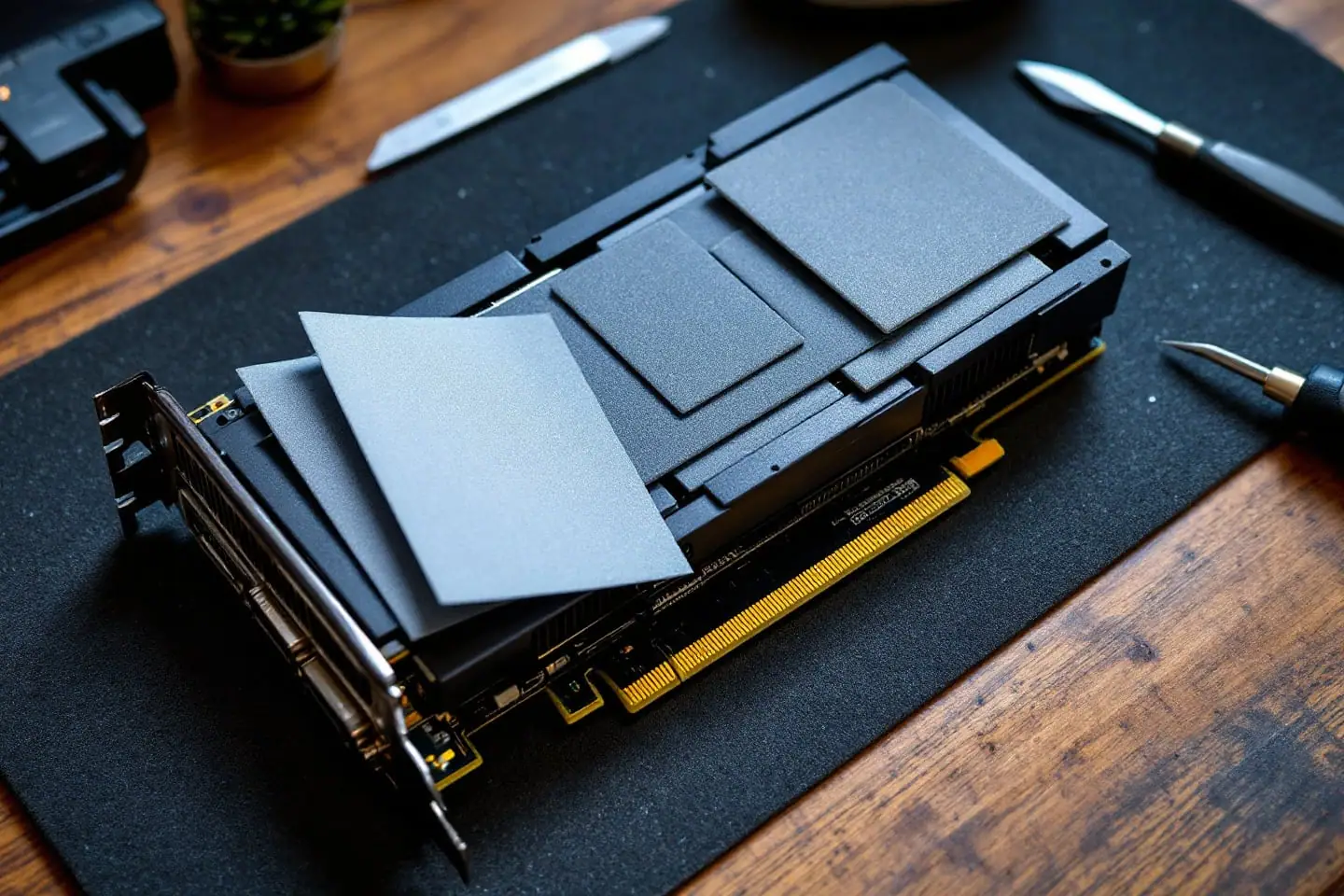
Thermal paste gets the attention, but most of the chips in a modern PC never touch paste at all. Memory chips on a graphics card, the voltage regulators that feed the GPU, an M.2 drive under a motherboard heatsink and half the parts inside a laptop sit under thermal pads: soft, rubbery sheets that fill gaps paste cannot. When a pad is the wrong thickness, the damage is rarely to the chip under the pad. It is usually to the chip next to it.
Where pads sit, and why they are there
Paste works when two flat surfaces almost touch. A pad is for the opposite case: a heatsink that has to cover several chips of different heights at once. A graphics card cooler is machined to sit flush on the GPU die, so the memory chips and regulators around it end up a fraction of a millimeter to a couple of millimeters short of the cooler. The pad fills that gap, insulates electrically and absorbs the height differences between parts.
| Where | What the pad cools | What to watch |
|---|---|---|
| Graphics card, front | Memory chips, voltage regulator MOSFETs and chokes | Several thicknesses on one card, often within a few millimeters of each other |
| Graphics card, back | Hot spots behind the GPU and memory, pressed against the backplate | Usually thicker than the front pads |
| Laptop heatsink | Regulators, memory, sometimes the chipset | The CPU and GPU dies take paste; everything around them takes pads |
| M.2 drive heatsink | The controller and flash chips | A protective film on both sides of the pre-cut pad |
| Older desktop boards | Chipset and regulator heatsinks | Pads and old tape that may have hardened |
Why thickness matters more than the conductivity figure
Pad packaging used to lead with a conductivity number in watts per meter-kelvin (W/mK). Neither Arctic nor Thermal Grizzly prints one for its pads. Thermal Grizzly says it stopped publishing those ratings at the end of 2020, and Arctic describes its TP-3 in terms of hardness and a thermal resistance curve instead. Methods varied so much between makers that the numbers never compared well.
The more useful idea is thermal resistance: how many degrees of temperature difference it takes to push one watt across the pad. For a flat pad it works out as thickness divided by (conductivity times area). Here is a worked example you can check with a calculator.
Say a memory chip has a 12 by 14 mm top surface, which is 168 square millimeters, or 0.000168 square meters.
- A 1.0 mm pad with a conductivity of 6 W/mK: 0.001 / (6 x 0.000168) = 0.99 degrees per watt.
- A 0.5 mm pad with a conductivity of 3 W/mK: 0.0005 / (3 x 0.000168) = 0.99 degrees per watt.
Half the conductivity at half the thickness gives exactly the same result. Arctic's own page says the same thing in plainer words: the thinner the pad, the lower its thermal resistance. So the right pad is the thinnest one that still makes firm contact, not the one with the biggest number on the box.
Now the part that catches people. Suppose you fit a pad that is too thick and it does not compress enough, so the cooler sits a little high. The paste layer on the GPU die, which should be thin, now has to fill a larger gap. With hypothetical numbers: a die with 300 square millimeters of contact area, paste rated 8 W/mK, a bond line that grows from 0.05 mm to 0.25 mm. The resistance rises from about 0.02 to about 0.10 degrees per watt. At 200 W that is roughly 17 degrees hotter, and that is the generous case where the paste fills the gap completely. In practice it leaves dry spots and the GPU throttles or shuts down. A pad that is too thin, on the other hand, leaves the memory chip under it barely touching the cooler, which shows up as high memory temperatures while the GPU core looks fine.
Compression and hardness
Pads are made to be squeezed. Arctic tests its TP-3 by pressing a 1 mm sample down to 0.8 mm, and it says the 0.5 mm version can compress to 0.3 mm, making up height differences of up to 0.2 mm. Its advice is to pick a pad slightly thicker than the gap, such as 1.5 mm for a 1.2 mm gap. Below about 0.2 mm, Arctic suggests paste instead; above about 3 mm, it says the design itself needs a second look.
Hardness decides how much force that squeeze takes. Pad hardness is quoted on the Shore OO scale, used for soft rubbers and gels. Arctic lists the TP-3 at 55 Shore OO and Thermal Grizzly lists Minus Pad 8 at Shore 00-60, both on the soft end. A soft pad compresses under normal screw pressure without bowing the circuit board. A hard pad of the same thickness pushes back, which can lift the cooler off the main die even when the measured thickness looks right. That is one reason "the same size as the original" is not always enough: the original may have been softer.
Soft pads have a cost. They tear easily, and Arctic recommends lifting the protective film with the tip of a utility knife rather than peeling it with a fingernail.
Measuring the old pads
The pads you take out are the best record of what the card needs, as long as you read them carefully.
- Photograph the cooler and the board before anything moves. Pads of different thicknesses sit side by side and look identical once they are off.
- Draw a quick map on paper: each chip, the pad that covered it, and a number for its thickness.
- Measure with calipers, closing the jaws until they just touch. Squeeze and a soft pad reads thin.
- Measure where you can, in this order of preference: a part of the pad that overhung the chip edge and was never compressed, then an intact piece from the middle, then the imprint left on the cooler.
- Round up to the next standard size if the reading falls between sizes. A used pad has been compressed and may have taken a set, so it reads thinner than it started.
A clear imprint of the chip on a pad means it was making contact. A pad with no imprint over a chip was not doing its job and points to the thickness being wrong from the start. Community lists of pad thicknesses exist for popular graphics cards. Treat them as a starting point only, since the same card model can change between board revisions.
Pad or putty
Thermal putty is a soft, non-conductive gap filler sold in a tub. Instead of matching a sheet thickness to each gap, you press a small blob onto each chip and let the cooler squeeze it to whatever height the gap is. Thermal Grizzly says its TG Putty bridges gaps of roughly 0.2 to 3.0 mm and positions it as a replacement for graphics card pads, because cards often use several pad thicknesses.
| Pads | Putty | |
|---|---|---|
| Matching the gap | You must measure and choose a thickness | Fills whatever gap exists |
| Mess | Clean, cut with a knife | Gloves or a spatula, residue to clean later |
| Removal | Peels off, can sometimes be reused | Scraped off, not reused |
| Risk of lifting the cooler | High if the pad is too thick or hard | Lower, but too large a blob still pushes back |
| Use on a CPU or GPU die | No | No, the maker rules it out |
Putty suits a card nobody has documented; pads are tidier to remove next time. Neither goes on the main die; that is a job for paste, and the paste amount guide covers how much.
When to replace them
Pads do not have a service interval. Arctic's FAQ says a pad can be reused as long as it has not degraded, and lists hardened, dirty or oily pads as degraded. In practice:
- Reuse a soft, clean pad that comes away in one piece and goes back in exactly the same spot.
- Replace a pad that tore, crumbled, went hard or left oily residue on the board.
- Replace all pads on a card if memory or regulator temperatures have climbed while the GPU core temperature has not.
- Replace them whenever you swap the cooler for a different model, since the gaps change.
Replacing pads in the right order
- Remove the cooler's screws in reverse of any numbered order stamped on it, a turn at a time.
- Lift the cooler off and unplug the fan and lighting cables.
- Photograph, map and measure the old pads as described above.
- Clean the old paste from the GPU die and cooler base first, with 99 percent isopropyl alcohol and lint-free wipes.
- Peel the old pads off and wipe away residue on the chips and the cooler with alcohol. Let it dry.
- Cut each replacement pad to the size of the chip top, or a hair larger. It is fine to cover a row of memory chips with one strip.
- Lift one film, lay the pad on the chip, then lift the second film. Leaving that second film on is the classic mistake.
- Apply paste to the GPU die last, so it is fresh when the cooler goes on.
- Lower the cooler straight down and tighten in numbered or cross order, a little at a time, as in the step-by-step repasting guide.
- Do a test fit if you can: take the cooler back off and look at the paste on the die. An even, thin spread means good contact. A barely touched blob means the pads are holding the cooler up.
After reassembly, compare GPU core, hot spot and memory temperatures under the same load you measured before. If the core is fine and memory is high, a pad is short. If the core runs away and memory is fine, a pad is too thick.
Mistakes that cost a second teardown
- Stacking two hard pads to make up a thickness. Arctic says its soft TP-3 can be stacked one layer at a time to avoid trapping air, and notes that harder pads often lose performance when stacked.
- Putting a pad on the GPU die "to be safe". A pad has far more thermal resistance than a thin paste layer.
- Putting paste on memory or regulators because the pad tore. The gap is too big for paste to bridge.
- Forgetting the pads on the backplate side, or putting the front strips on the back.
- Handling the board without grounding; our anti-static basics cover what actually protects it.
Keep the map with the card. The next time it comes apart, the thicknesses are already written down.
Sources and further reading
- Arctic, TP-3 thermal pad product page (thicknesses, 55 Shore OO hardness, compression test, thinner pad means lower resistance)
- Arctic Support, TP-3 FAQ (stacking, reuse of undegraded pads, choosing a pad slightly thicker than the gap, removing the film)
- Thermal Grizzly, Minus Pad 8 product page (thicknesses, hardness, electrical insulation)
- Thermal Grizzly, TG Putty product page (gap range, use on graphics cards and laptops, not for CPU or GPU dies)
- Wikipedia, Thermal interface material (background on pads, gap fillers and bond line thickness)
Wondering whether a cooler is enough? check the headroom with the cooler TDP calculator.

Corey handles cooling: thermal paste, pads, delidding and liquid metal. He explains where the heat goes in plain numbers and is suspicious of any cooler box that prints a wattage without saying how it was measured.